Shrink any video to fit Gmail, Discord or iMessage
Pick where it's going; get a file just under the limit, on your phone, nothing uploaded.
Saves the sound track as an .m4a file (AAC), which plays in Music, Files, Windows and Android. The sound is copied without re-encoding when it's already AAC, as iPhone and most Android videos are.
Trim (optional)
Minutes:seconds, like 0:15 or 1:30. Trimming first is the best way to keep quality when the limit is small.
Starting…
Keep this page open and the screen on until it's done.
| Before | After |
|---|
On iPhone, tap "Save to Photos or Files", then Save Video (Photos) or Save to Files.
Pro is coming soon · $4.99 lifetime or $1.99 a month
- Unlimited videos a day, any length
- Batch: fit several videos in one go
Everything above is free while we launch. Leave your email and we'll write once, when Pro is ready.
Runs in your browser. Nothing is uploaded. No sign-up.
- iPhone MOV (HEVC)
- Android MP4
- WebM
- Gmail
- Outlook
- iCloud Mail
- Discord
- iMessage and texts
- Teams
- Slack
- Canvas
- Any size in MB
Example
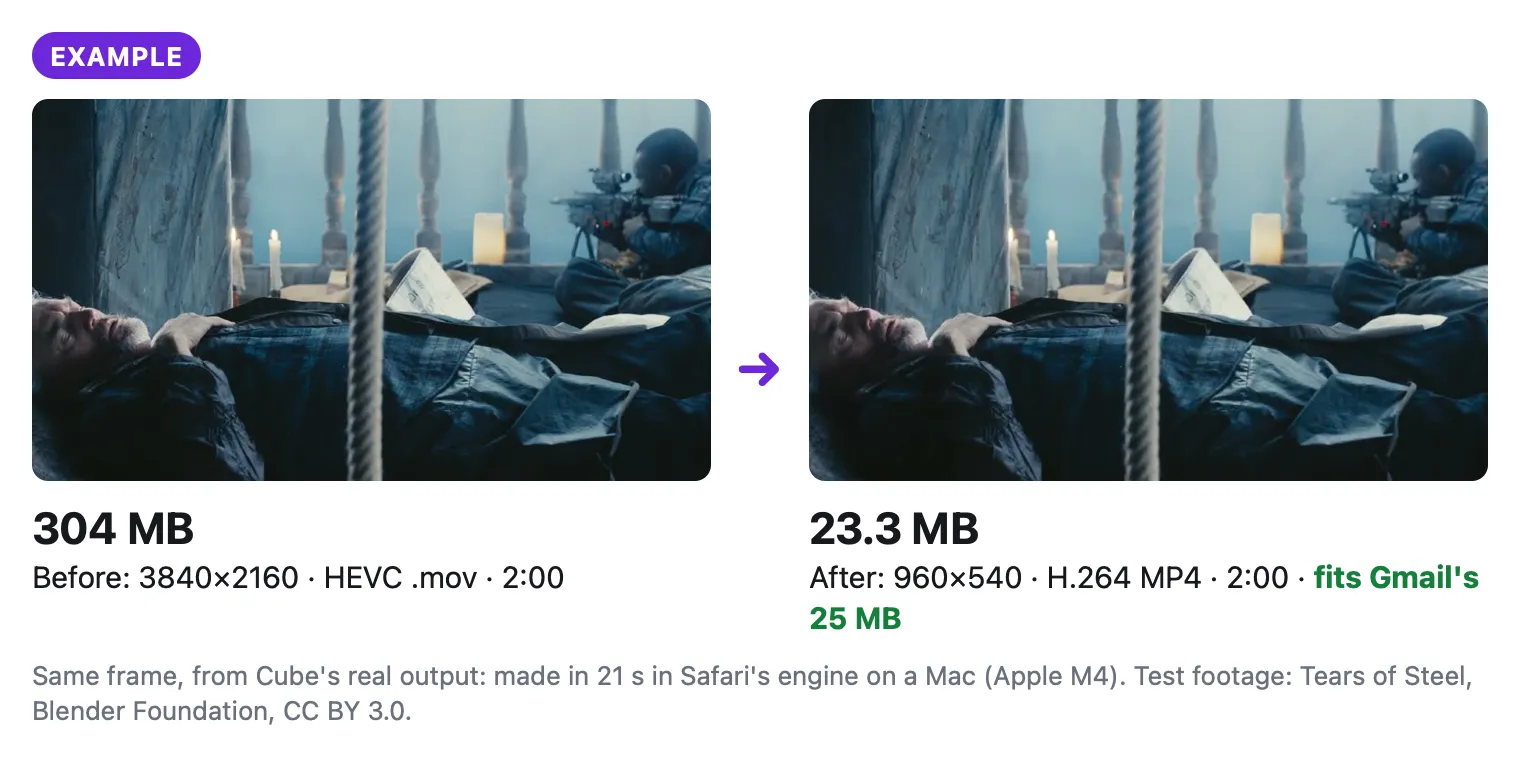
Example: a real result from the tool on this page, using a 2-minute 4K test video made from the Creative Commons film Tears of Steel (Blender Foundation, CC BY 3.0).
All limits come from each service's own help page, checked Nov 22, 2026:
| Where it's going | Limit | Source |
|---|---|---|
| Gmail | 25 MB per email, all attachments together | Gmail Help |
| Outlook | 20 MB to be safe (Microsoft lists 20 MB and 25 MB on different pages) | Microsoft Support |
| iCloud Mail | 20 MB per message (up to 5 GB with Mail Drop) | Apple Support |
| Discord | 20 MB on a free account (it was 10 MB until August 2026) | Discord Support |
| iMessage / text | Apple publishes no iMessage size limit; MMS (green bubble) limits are set by carriers, about 1 MB | Apple: Share long videos |
| Teams | 100 MB per file in chat; channel Files take up to 250 GB | Microsoft Learn |
| Videos up to 100 MB at 720p (64 MB at 480p on slower connections); documents up to 2 GB | WhatsApp Help Center | |
| Slack | Files up to 1 GB | Slack Help Center |
| Canvas | 500 MB per media upload; 50 MB personal file quota by default (schools can change quotas) | Instructure Community |
How it works
-
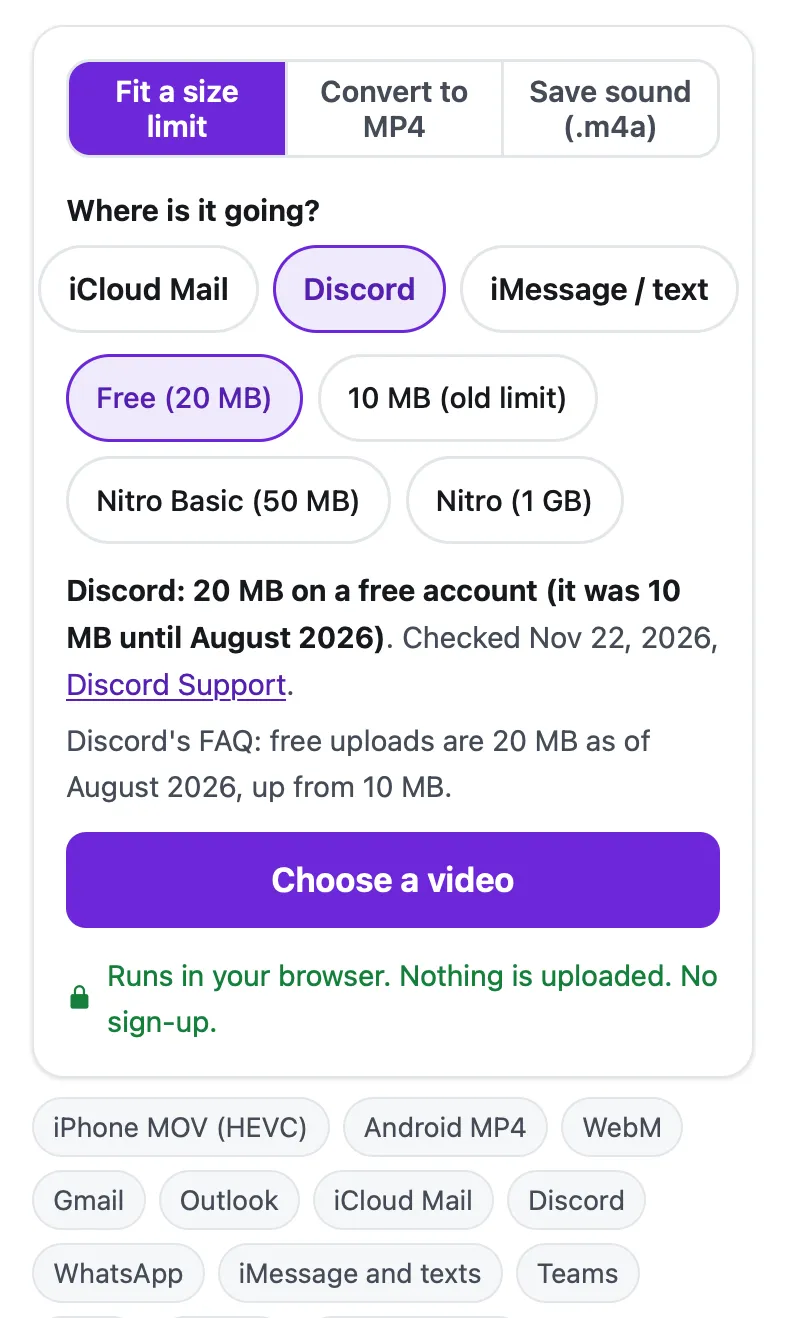 Pick where it's going. Tap Gmail, Discord, WhatsApp, Messages, Teams, Canvas or a custom size. The limit and the date we checked it show right there.
-
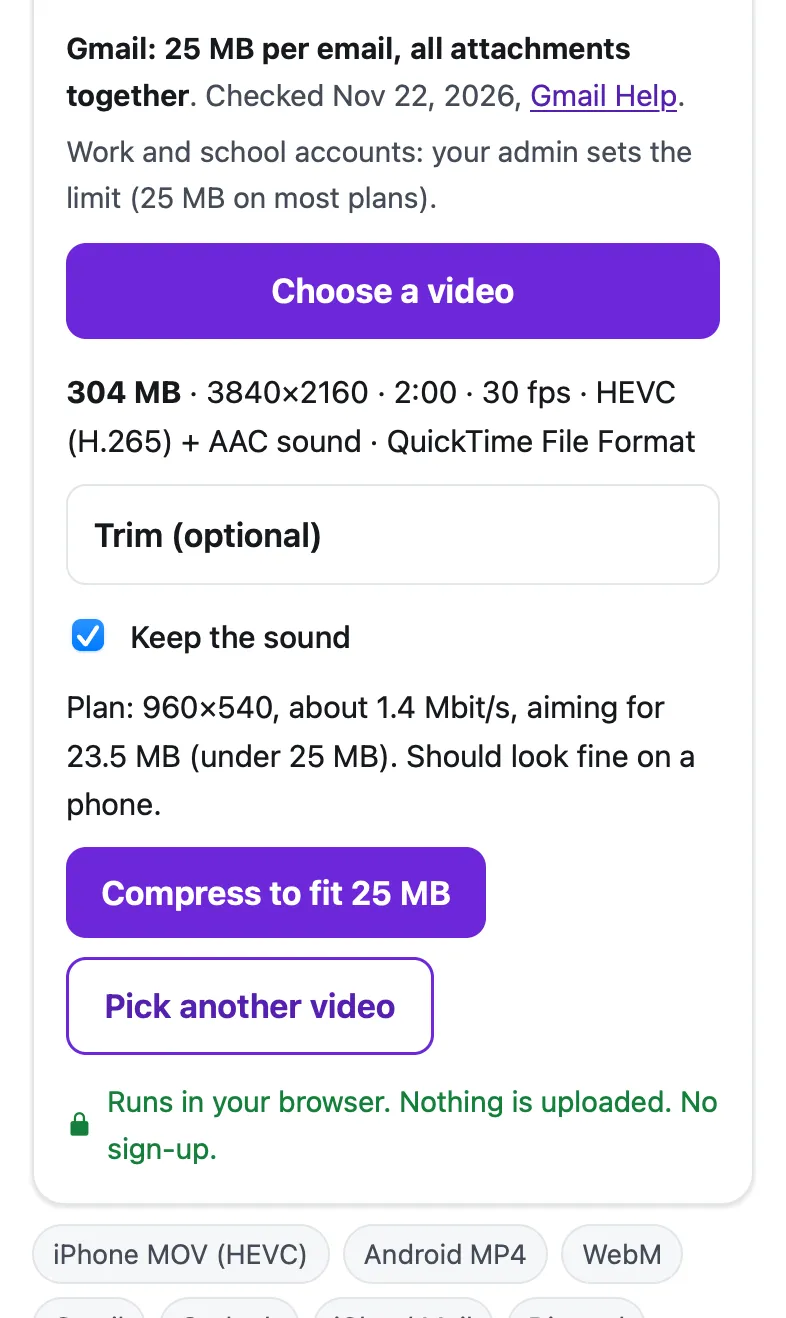 Choose the video. From Photos or Files. Cube shows its size and plans the resolution and bitrate that land just under the limit. Trim it first if you like.
-
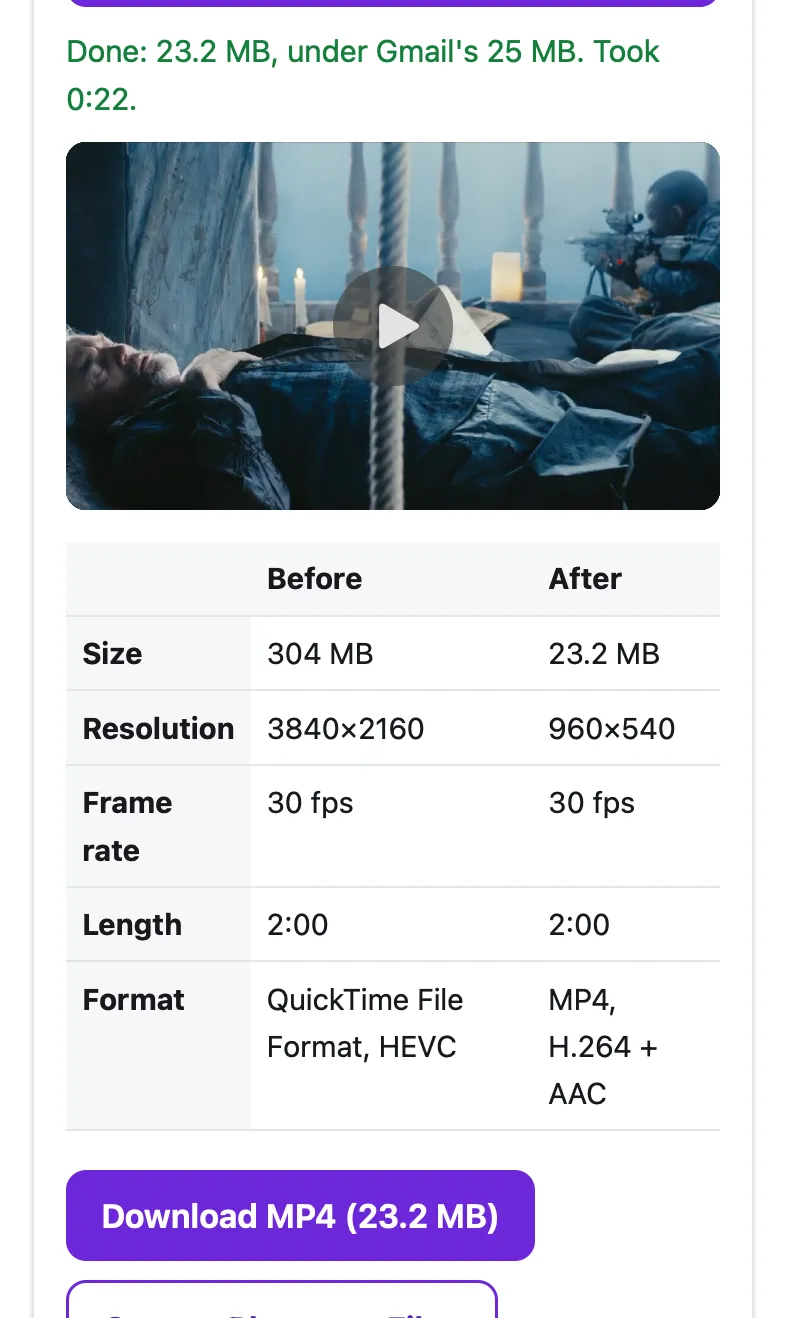 Download or share it. Save the MP4 to Photos or Files, then attach it. If the encoder overshoots, Cube encodes again a little smaller, so the file always lands under the limit.
Where are you sending it?
- For Gmail (25 MB)Keep it a real attachment instead of a Drive link.
- For Discord (20 MB free)Discord's free limit, the old 10 MB, Nitro and Nitro Basic.
- For WhatsApp100 MB at 720p, 64 MB on slow connections, Status up to 90 seconds.
- For Outlook20 MB for personal accounts, 10 MB for many work accounts.
- For Microsoft Teams100 MB per file in chat, 10 MB when you email a channel.
- MOV to MP4 on iPhoneTurn an iPhone HEVC video into an MP4 that Windows and Android play.
- Save the sound (.m4a)Keep just the audio of a video, copied without re-encoding.
- Too large to email from iPhoneMail Drop or a smaller attachment: which to use.
- A long video in MessagesiMessage, MMS and RCS limits, and Apple's own options.
- Canvas uploads500 MB media uploads and the 50 MB personal file quota.
Why you can trust it
Price
Free · today
- Fit any video to Gmail, Outlook, Discord, WhatsApp, Messages, Teams, Slack, Canvas or a custom size
- Convert iPhone MOV (HEVC) to MP4 (H.264)
- Save the sound as .m4a
- Trim before compressing
- No sign-up, no watermark
Pro coming soon
$4.99 lifetime or $1.99 a month
- Unlimited videos a day, any length
- Batch: fit several videos in one go
Tell me when Pro is ready
Everything above is free while we launch. Leave your email and we'll write once, when Pro is ready.
Questions people ask
How do I compress a video to a specific size?
Pick the destination or type a size in MB, choose the video and tap Compress. Cube works out the resolution and bitrate from the length, checks the real size afterwards, and encodes again a little smaller if it came out over.
How do I make a video smaller to email from my iPhone?
Open this page in Safari, tap Gmail, iCloud Mail or Outlook, and choose the video from Photos. Our 2-minute 4K test video went from 304 MB to 23.3 MB for Gmail in 21 seconds in Safari's engine on a Mac.
What is Discord's file size limit?
20 MB on a free account since August 2026 (it was 10 MB), 50 MB with Nitro Basic and 1 GB with Nitro, according to Discord's File Attachments FAQ.
How long a video fits in 25 MB?
At 30 fps with sound, a 30-second clip stays at 1080p, a 1-minute clip at 720p and 2 minutes at 960×540. Up to about 6½ minutes fits at 360p or better.
Does it lose quality?
Some, because the file gets much smaller. Cube lowers the resolution before the picture gets blocky. Our 25 MB result scored an average PSNR of 37.1 dB against the original scaled to the same size.
Does my video get uploaded?
No. The video is read, compressed and saved inside your browser, on your device. Nothing is sent to us or anyone else.
Does it work on iPhone?
Yes. It's built for Safari on iPhone and reads iPhone videos (MOV with HEVC) directly. Keep Safari open and the screen on while it works.
Which videos does it read?
MOV from iPhone, MP4 from Android phones and cameras, M4V, WebM and MKV. The result is an MP4 with H.264 video and AAC sound, which plays almost everywhere.
What if my video can't fit the limit?
Cube tells you how much of it would fit, offers to trim it to that, and explains the link route for that destination: a Google Drive link for Gmail, OneDrive for Outlook, Mail Drop for iPhone Mail.
Is Cube free?
Yes, free while we launch: no sign-up, no watermark. A Pro plan with unlimited and batch use is planned for later.
Guides
- Too large to email from iPhoneiPhone says the video is too large to email? Send it with Mail Drop (up to 5 GB) or shrink it under 20–25 MB in Safari. Steps and real limits.
- Send a long video on iMessageLong video won't send in Messages, or arrives blurry? Apple's own fixes (AirDrop, iCloud link, Mail Drop), carrier MMS limits, and how to shrink it.
- iPhone to Android, full qualityTexted videos from iPhone to Android arrive blurry because of MMS. Five ways that keep quality (RCS, Quick Share, Google Photos, links), with real limits.
- iPhone video won't play on WindowsiPhone videos are HEVC, which Windows doesn't play out of the box. Fix it with Microsoft's $0.99 extension, an iPhone setting, or a free MP4 conversion.
- Video too large for CanvasCanvas takes media up to 500 MB and gives you 50 MB of personal files by default. Find which limit you hit and shrink the video in your browser.