How to send a long video on iMessage
Apple publishes no size limit for iMessage, but it says that "some long video files are too large to send in a standard text message" and suggests AirDrop, an iCloud link or Mail Drop instead. If the other person has a green bubble (SMS/MMS), the carrier's limit applies, about 1 MB on T-Mobile and AT&T, and the video gets squeezed hard. To keep control of quality, shrink and trim the video yourself first with the tool on this page.
Why won’t my long video send in Messages?
There are three different limits behind “this video won’t send”, depending on the color of the bubble:
- Blue bubble (iMessage). Apple publishes no size limit. Its Messages guide says “iPhone may compress photo and video attachments when necessary”, and its long-video guide says “some long video files are too large to send in a standard text message.”
- Green bubble (SMS/MMS). The carrier sets the limit, and it’s tiny: T-Mobile lists “1MB” to send, AT&T “up to 1MB”, and Verizon “1.2MB image / 3.5MB video”, warning that limits between carriers are “typically 300-600 KB”. AT&T says larger attachments “are compressed before sending”.
- RCS (iOS 18 or later, with a carrier that supports it). Apple says RCS sends “high resolution photos and videos” to Android phones; it publishes no number. T-Mobile lists 100 MB.
If what you send looks small and blurry even in blue bubbles, check Settings › Apps › Messages for Low Quality Image Mode (Apple documents the setting there) and turn it off.
What does Apple suggest for long videos?
Apple’s own answer for iPhone is to use something other than a text message:
- AirDrop, for someone nearby. Apple calls it “the simplest way to send a large video to a nearby iPhone, iPad, Mac, or Apple Vision Pro”. The devices need to be within about 30 feet (10 meters). To send to someone who isn’t in your contacts, they set Settings › General › AirDrop › Everyone for 10 Minutes. In the share sheet, tap Options and turn on All Photos Data to send the original.
- An iCloud link. Apple’s iOS 26 guide describes it as: tap Share, tap Options, then tap Copy iCloud Link, and paste the link in Messages; “recipients have 30 days to download” it. It needs iCloud Photos. (Apple’s iOS 27 guide no longer lists this option, so on iOS 27 look for it in Options before relying on it.)
- Mail Drop, by email. In Photos, tap the video, tap Share, then Mail; Mail offers Mail Drop for large files, which Apple allows up to 5 GB, for 30 days. See video too large to email from iPhone.
How do I shrink a long video to send it in Messages?
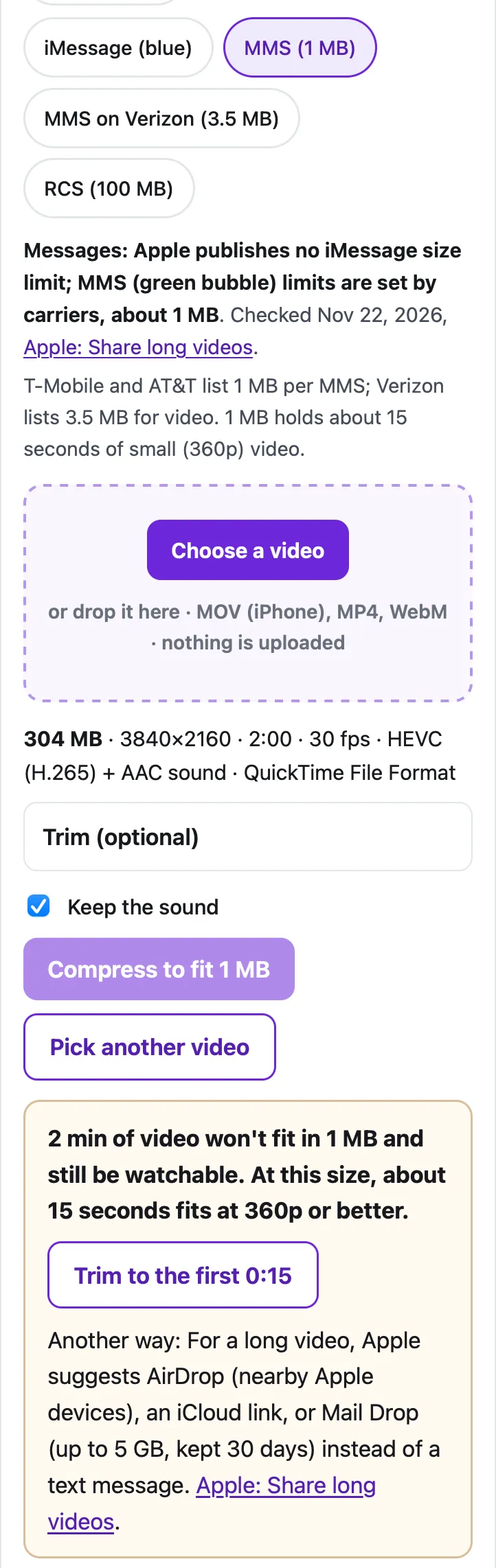
When you’d rather send the video itself, so it plays right in the chat, shrink it first. Pick the bubble type below: iMessage (blue) aims for 100 MB, MMS (1 MB) for a green bubble, MMS on Verizon for 3.5 MB, RCS for 100 MB.
Shrink a video for Messages
Saves the sound track as an .m4a file (AAC), which plays in Music, Files, Windows and Android. The sound is copied without re-encoding when it's already AAC, as iPhone and most Android videos are.
Trim (optional)
Minutes:seconds, like 0:15 or 1:30. Trimming first is the best way to keep quality when the limit is small.
Starting…
Keep this page open and the screen on until it's done.
| Before | After |
|---|
On iPhone, tap "Save to Photos or Files", then Save Video (Photos) or Save to Files.
Pro is coming soon · $4.99 lifetime or $1.99 a month
- Unlimited videos a day, any length
- Batch: fit several videos in one go
Everything above is free while we launch. Leave your email and we'll write once, when Pro is ready.
Runs in your browser. Nothing is uploaded. No sign-up.
- Tap Choose a video and pick it from Photo Library.
- For a green bubble, open Trim first: 1 MB holds only about 15 seconds of small video. If it’s too long, the tool says how much fits and offers to trim it for you.
- Tap Compress, then Save to Photos or Files, and send the new video in Messages.
What did our tests produce?
On a 2-minute 4K HEVC test clip recorded the way an iPhone stores it (304 MB, made from the Creative Commons film Tears of Steel), in Safari’s engine (WebKit) on a Mac with an Apple M4 chip:
| Target | What we sent | Result | Time |
|---|---|---|---|
| iMessage, 100 MB | The full 2 minutes | 93.9 MB, 1920×1080 | 21 seconds |
| MMS, 1 MB | The first 15 seconds | 0.95 MB, 640×360 | 3.1 seconds |
So a 2-minute 4K video fits comfortably in a 100 MB iMessage at full 1080p, while an MMS really is only for a few seconds. The tool’s plan for 3.5 MB (Verizon) fits about 50 seconds at 360p or better.
What if the other person has an Android phone?
Then it’s either RCS (if both carriers support it and you’re on iOS 18 or later) or MMS, with the 1 MB-class limits above; the Android side, including Google Messages’ HD+ option, is in how to send a long video by text on Android. For full quality, skip Messages and use a link or an app both of you have; see how to send a video from iPhone to Android without losing quality. If you both use WhatsApp, its video limit is 100 MB: see compressing a video for WhatsApp.
Questions people ask
What is the iMessage video size limit?
Apple doesn't publish one. Its Messages guide only says iPhone may compress photo and video attachments when necessary, and that some long videos are too large for a standard text message.
Why do videos look blurry when I text them?
If the bubble is green, the video went by MMS, and carriers cap MMS at about 1 MB (T-Mobile and AT&T) to 3.5 MB (Verizon, video), compressing anything bigger. Also check Settings › Apps › Messages for Low Quality Image Mode, and turn it off.
How do I send a long video from iPhone to iPhone?
If you're near each other, AirDrop: Apple calls it the simplest way to send a large video to a nearby Apple device, within about 30 feet (10 meters). Otherwise use Mail Drop, an iCloud link, or a shrunk copy sent in Messages.
How long a video can I send by MMS?
Very short. At 1 MB, the tool's plan fits about 15 seconds at 640×360 with sound. Our test turned the first 15 seconds of a 4K clip into 0.95 MB.
Does RCS fix it for Android contacts?
It helps. With iOS 18 or later and a carrier that supports RCS, Apple says iPhone sends high-resolution photos and videos to Android phones. T-Mobile lists 100 MB for photos and videos over RCS.
Related
- iPhone to Android, full qualityTexted videos from iPhone to Android arrive blurry because of MMS. Five ways that keep quality (RCS, Quick Share, Google Photos, links), with real limits.
- Too large to email from iPhoneiPhone says the video is too large to email? Send it with Mail Drop (up to 5 GB) or shrink it under 20–25 MB in Safari. Steps and real limits.
- Compress for WhatsAppFit a video to WhatsApp's 100 MB video limit, its 64 MB slow-connection limit or a 90-second Status, in your browser. Free, nothing uploaded.
- All guidesEvery Cube guide, by task.