Video too large to upload to Canvas
Canvas has two limits that catch videos. Its Media tool and media submissions take files up to 500 MB, and the personal file quota is 50 MB by default (course files 500 MB), though schools can change course and group quotas. A 4K iPhone video passes 500 MB in about 3 minutes 20 seconds. Shrink it under the limit with the tool on this page, or upload it to Canvas Studio or YouTube (Unlisted) and submit the link if your instructor accepts it.
Which Canvas limit did you hit?
Canvas, made by Instructure, has several limits, and the error depends on how you upload. From Instructure’s Canvas File Quotas page and its media help, checked November 22, 2026:
| How you upload | Limit | Counts toward your quota? |
|---|---|---|
| Media tool (Upload/Record Media) | 500 MB per video | No |
| Media file as an assignment submission | 500 MB (“Canvas will not accept media uploads larger than 500 MB”) | No |
| File upload (Upload Files, discussions, your files) | 5 GB per file for most types | Yes: 50 MB personal quota by default |
| Course files (instructors) | 5 GB per file | Yes: 500 MB course quota by default |
| Canvas Studio, where your school has it | 10 GB per file | Not stated |
Two rules explain most “too large” surprises. First, Instructure says media “uploaded via any other method (such as the Upload Files link) count toward the user quota”, so a video attached the regular way into your own files hits the 50 MB personal quota quickly. Second, file upload size limits “cannot be modified”, while quotas can: “Some individual quota defaults can be modified by an account admin.” If the error names a number, that number is your school’s.
How big is a phone video, compared with 500 MB?
Our 4K test video, recorded the way an iPhone stores it, uses about 2.5 MB per second, so a 4K iPhone video reaches 500 MB in about 3 minutes 20 seconds. A 1080p phone video in our test used about 2 MB per second, reaching 500 MB in about 4 minutes. A presentation recording of 5 to 10 minutes is well over the limit either way, and far over a 50 MB quota.
The good news is that 500 MB is a lot of room once the video is compressed sensibly. The tool’s plan keeps a 10-minute video at 1080p in 500 MB and a 20-minute one at 720p.
How do I shrink a video for Canvas?
Fit a video to Canvas
Saves the sound track as an .m4a file (AAC), which plays in Music, Files, Windows and Android. The sound is copied without re-encoding when it's already AAC, as iPhone and most Android videos are.
Trim (optional)
Minutes:seconds, like 0:15 or 1:30. Trimming first is the best way to keep quality when the limit is small.
Starting…
Keep this page open and the screen on until it's done.
| Before | After |
|---|
On iPhone, tap "Save to Photos or Files", then Save Video (Photos) or Save to Files.
Pro is coming soon · $4.99 lifetime or $1.99 a month
- Unlimited videos a day, any length
- Batch: fit several videos in one go
Everything above is free while we launch. Leave your email and we'll write once, when Pro is ready.
Runs in your browser. Nothing is uploaded. No sign-up.
- Pick Media upload (500 MB) or Personal files (50 MB). If your course shows a different limit, tap Custom size and type it.
- Tap Choose a video. On a phone, pick it from your photos; on a laptop, the .mov or .mp4 file.
- Optional: Trim dead time at the start and end, which leaves more bits for the rest.
- Tap Compress. A long video takes a while; keep the tab open.
- Download the MP4 and upload it to Canvas the same way you tried before.
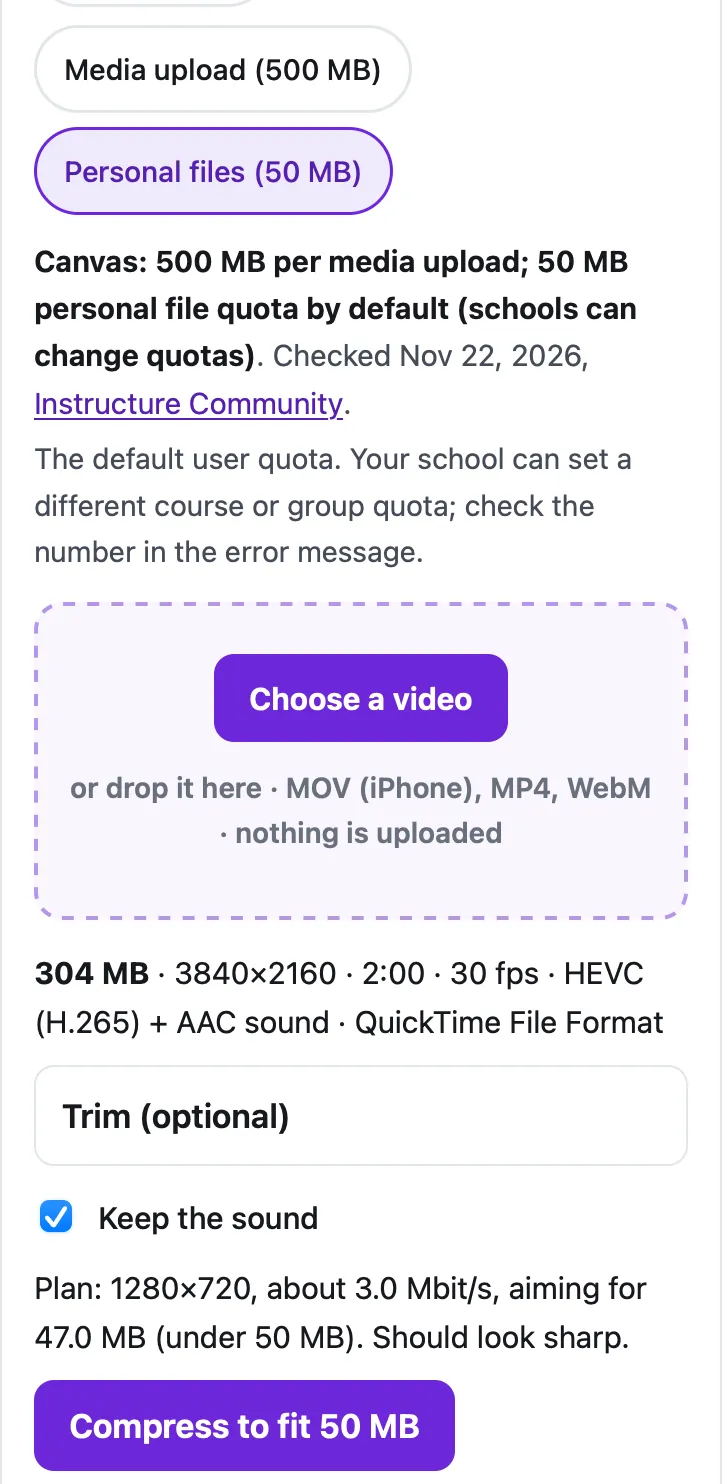
On our 2-minute 4K test clip (304 MB, made from the Creative Commons film Tears of Steel), the 50 MB setting produced 46.8 MB at 1280×720 in 21 seconds, measured in Safari’s engine (WebKit) on a Mac with an Apple M4 chip. That clip is already under 500 MB, so for the Media tool the tool says it fits and needs nothing.
What if it still won’t fit?
- Use the Media tool instead of Upload Files. Media uploads take up to 500 MB and don’t use your 50 MB quota.
- Use Canvas Studio if your school has it: Instructure says it “can upload specific media files up to 10 GB”, including .mov and .mp4.
- Submit a link. Instructure suggests hosting files over 500 MB “through an external source such as YouTube”; uploading as Unlisted keeps it out of search. Ask your instructor first whether a link is acceptable.
- Ask about the quota. If a course or group is full, only an admin can raise it.
If your instructor’s computer can’t play an iPhone .mov, convert it to MP4 first: see MOV to MP4 on iPhone. For emailing the file to a teacher instead, see video too large to email from iPhone and compressing a video for Outlook, which many schools use.
Questions people ask
What is the maximum video size for Canvas?
500 MB through the Media tool or as a media submission: Instructure says Canvas will not accept media uploads larger than 500 MB. Files uploaded the regular way can be up to 5 GB, but they count toward a quota (50 MB for your personal files by default).
Do assignment submissions count toward my Canvas quota?
No. Instructure says attachments added to a graded assignment submission are copied to your user files but don't count against your quota. Media uploaded through the Upload/Record Media link doesn't count either.
Can my school change the Canvas limits?
Partly. Admins can change default quotas for courses, users and groups, and set course or group quotas individually. Instructure says the file upload size limits themselves can't be modified.
How big a video can Canvas Studio take?
Up to 10 GB, in formats including .mov and .mp4, according to Instructure. Studio is part of Canvas Plus and Canvas Next, so not every school has it.
How do I make a video smaller for Canvas?
Pick Canvas in the tool on this page (500 MB for media, 50 MB for personal files) or type your course's limit as a custom size, choose the video and tap Compress. It runs in your browser; the video isn't uploaded until you upload it to Canvas yourself.
Related
- Compress for OutlookShrink a video under Outlook's 20 MB attachment limit (10 MB for many work accounts) in your browser, so the email sends. Free, nothing uploaded.
- Too large to email from iPhoneiPhone says the video is too large to email? Send it with Mail Drop (up to 5 GB) or shrink it under 20–25 MB in Safari. Steps and real limits.
- MOV to MP4Turn an iPhone .mov (HEVC) video into an MP4 (H.264) that plays on Windows, Android and upload forms, in Safari. No app, nothing uploaded.
- All guidesEvery Cube guide, by task.