Get a video under 25 MB for Gmail
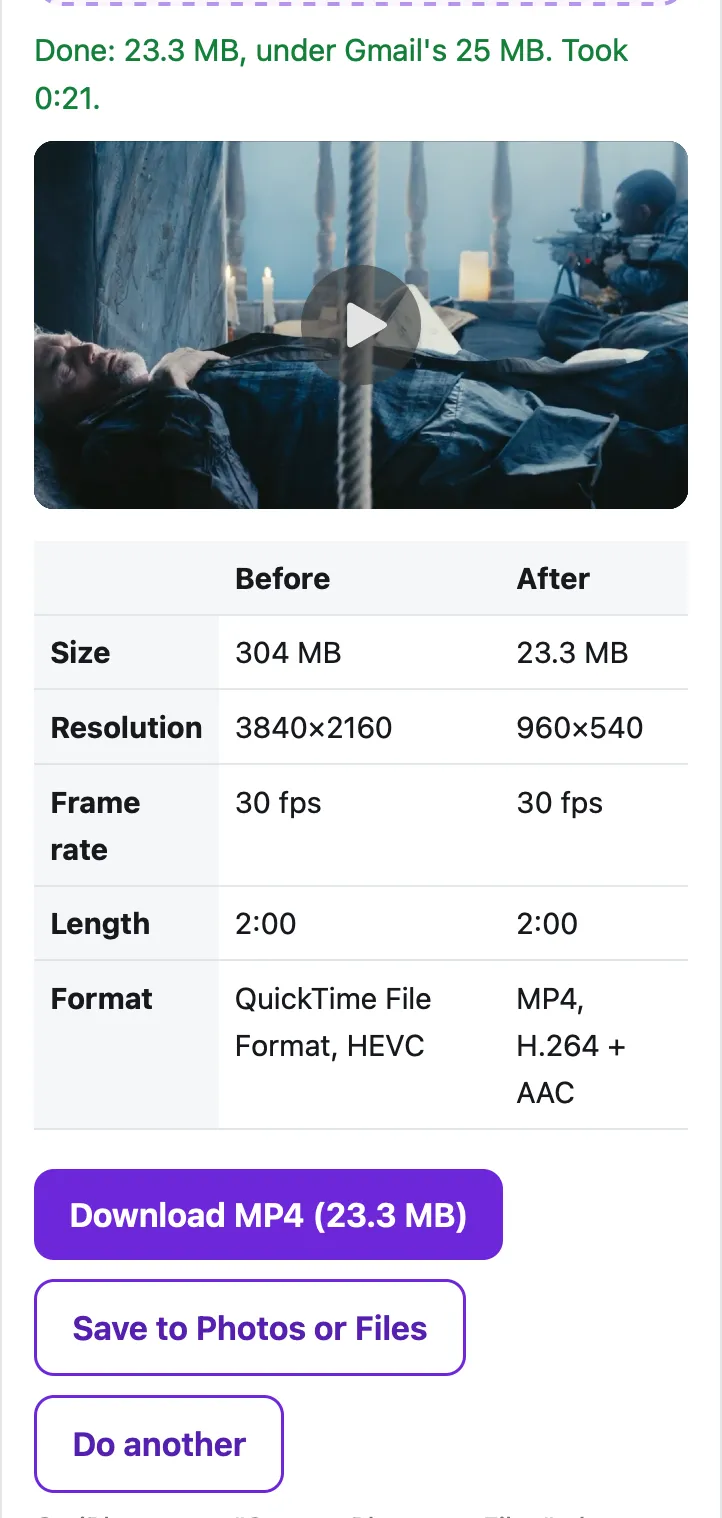
Gmail lets you attach 25 MB in total per email on a personal account; anything bigger is turned into a Google Drive link. Choose your video below and the tool compresses it to just under 25 MB on your device. A 2-minute 4K iPhone-style video (304 MB) came out at 23.3 MB, 960×540, in 21 seconds in Safari's engine on a Mac; a 2-minute 1080p clip took 5.7 seconds.
Fit a video to Gmail
Saves the sound track as an .m4a file (AAC), which plays in Music, Files, Windows and Android. The sound is copied without re-encoding when it's already AAC, as iPhone and most Android videos are.
Trim (optional)
Minutes:seconds, like 0:15 or 1:30. Trimming first is the best way to keep quality when the limit is small.
Starting…
Keep this page open and the screen on until it's done.
| Before | After |
|---|
On iPhone, tap "Save to Photos or Files", then Save Video (Photos) or Save to Files.
Pro is coming soon · $4.99 lifetime or $1.99 a month
- Unlimited videos a day, any length
- Batch: fit several videos in one go
Everything above is free while we launch. Leave your email and we'll write once, when Pro is ready.
Runs in your browser. Nothing is uploaded. No sign-up.
What is Gmail’s attachment size limit?
25 MB per email, for all attachments added together. Google’s Gmail Help page says “For personal Gmail accounts, the limit is 25 MB”, and that if your total attachment size goes over it, “Gmail automatically removes the attachment and adds it as a Google Drive link in the email.”
Work and school accounts are different: “your Google Workspace administrator sets the attachment sending limits.” Google’s admin help lists 25 MB for most plans and up to 50 MB on Enterprise Plus, on the web version of Gmail only. If you’re not sure which you have, aim for 25 MB; it works everywhere.
Two videos in one email share the same 25 MB. If you need to send two clips, either compress each to about 12 MB (use Custom size in the tool) or send two emails.
Why is my video too big for Gmail?
Because phones record a lot of data per second. Our 4K test clip, recorded the way an iPhone stores video, uses about 2.5 MB for every second, so only about 10 seconds of 4K fits in 25 MB. A 1080p clip from an Android phone in our test used about 2 MB per second. That’s why even a short video gets the “too large” treatment, and why compressing it works so well: most of those megabytes are detail you won’t see on a phone screen.
How do I get a video under 25 MB?
- Gmail is already selected in the tool at the top of this page. Tap Choose a video.
- On iPhone, pick it from Photo Library; on Android or a computer, from your files. The tool shows its size, resolution and length.
- If it’s longer than you need, open Trim and set a start and end.
- Tap Compress to fit 25 MB. The tool aims for about 23.5 MB, then checks the real size; if the encoder overshoots, it re-encodes once or twice at a lower bitrate.
- Tap Download, or on iPhone Save to Photos or Files. Then attach it in Gmail as usual.
What quality do you get at 25 MB?
It depends on length. These are our measured results in Safari’s engine (WebKit) on a Mac with an Apple M4 chip, on 2-minute test clips made from the Creative Commons film Tears of Steel:
| Source video | Result | Size | Time |
|---|---|---|---|
| 2 min, 4K HEVC (iPhone-style .mov), 304 MB | 960×540, 30 fps, with sound | 23.3 MB | 21 seconds |
| 2 min, 1080p H.264 (Android-style .mp4), 242 MB | 960×540, 30 fps, with sound | 23.4 MB | 5.7 seconds |
We compared all 3,600 frames of the 4K result with the original scaled to the same size (with ffmpeg): the average PSNR was 37.1 dB. Looking at frames side by side, it stays clean at phone and laptop size; fine texture (skin, fabric, grain) is what goes first. Shorter videos keep more: the tool’s plan for 25 MB keeps a 30-second clip at 1080p and a 1-minute clip at 720p. Up to about 6½ minutes still fits at 360p or better.
When should you send a Drive link instead?
When the video is long or the quality has to stay perfect: a 20-minute recital, a wedding clip, raw footage someone will edit. In those cases a link is better than any compression. In the Gmail app on iPhone, tap Attach, then pick the video from the Google Drive section (upload it to Drive first); on Android, tap Attach, then Insert from Drive. Google’s steps for sending Drive files also cover the sharing setting, so the person can open the file.
If you’re sending from the iPhone Mail app rather than Gmail, Apple’s Mail Drop can send files up to 5 GB; see video too large to email from iPhone. For Outlook, the limit is lower; see compressing a video for Outlook.
Questions people ask
What is the maximum video size for Gmail?
25 MB for all attachments together on a personal Gmail account. Work and school accounts follow the admin's setting; Google Workspace allows up to 50 MB on Enterprise Plus, on the web only.
Why can't I send a 37-second video on Gmail?
Because phone video is big. Our 4K iPhone-style test clip uses about 2.5 MB per second, so roughly 10 seconds of 4K already reaches 25 MB. A 37-second clip at that rate is about 94 MB.
How do I send a video larger than 25 MB in Gmail?
Either compress it below 25 MB with the tool on this page, or send it as a Google Drive link. Gmail does the second automatically when the attachments go over the limit.
Does Gmail compress videos automatically?
Google's help page doesn't describe any compression. What it says is that when attachments add up to more than the limit, Gmail removes them and adds a Google Drive link instead.
Is the person I send it to able to open an MP4?
Yes. The result is an MP4 with H.264 video and AAC sound, the most widely supported video format: it plays on iPhone, Android, Mac and in Windows' Media Player without extra apps.
Related
- Compress for OutlookShrink a video under Outlook's 20 MB attachment limit (10 MB for many work accounts) in your browser, so the email sends. Free, nothing uploaded.
- Too large to email from iPhoneiPhone says the video is too large to email? Send it with Mail Drop (up to 5 GB) or shrink it under 20–25 MB in Safari. Steps and real limits.
- Compress for DiscordShrink a video to just under Discord's 20 MB free upload limit, or 10 MB, 50 MB or 1 GB, right in your browser. Free, nothing uploaded.
- All Cube toolsShrink a video to fit Gmail, Discord, WhatsApp or any limit