Compress a video for WhatsApp
WhatsApp sends videos up to 100 MB at 720p on a fast connection and 64 MB at 480p on a slower one, and Status videos can be 90 seconds long; anything bigger has to go as a document (up to 2 GB). Pick the option below and the tool makes a 720p or 480p MP4 just under the limit on your device. Our 2-minute 4K test video became 84.9 MB at 1280×720 in 21 seconds.
Fit a video to WhatsApp
Saves the sound track as an .m4a file (AAC), which plays in Music, Files, Windows and Android. The sound is copied without re-encoding when it's already AAC, as iPhone and most Android videos are.
Trim (optional)
Minutes:seconds, like 0:15 or 1:30. Trimming first is the best way to keep quality when the limit is small.
Starting…
Keep this page open and the screen on until it's done.
| Before | After |
|---|
On iPhone, tap "Save to Photos or Files", then Save Video (Photos) or Save to Files.
Pro is coming soon · $4.99 lifetime or $1.99 a month
- Unlimited videos a day, any length
- Batch: fit several videos in one go
Everything above is free while we launch. Leave your email and we'll write once, when Pro is ready.
Runs in your browser. Nothing is uploaded. No sign-up.
What are WhatsApp’s video limits?
From WhatsApp’s own Help Center, checked on November 22, 2026:
- Video on a fast connection: 100 MB at 720p. “For users with a faster internet connection, the default video size limit is 100MB and 720p resolution.”
- Video on a slower connection: 64 MB at 480p. On slower connections “the default video size limit is 64MB and 480p resolution.”
- Document: 2 GB. “For documents, the maximum file size allowed is 2 GB.” WhatsApp raised this from 100 MB in May 2022.
- Status: 90 seconds. “The maximum duration for status is 90 seconds.”
WhatsApp also says that “media files are usually compressed when shared” and that the quality “might be lower than the original version.” You can pick HD quality when sending a photo or video, but WhatsApp gives no size or resolution for it, and HD isn’t available for Status updates. Source: WhatsApp Help Center: send media.
Why does the tool stop at 720p for WhatsApp?
Because WhatsApp does. A 4K or 1080p video sent as a normal video is brought down to 720p (or 480p) by WhatsApp anyway, so encoding it bigger only makes the upload longer. The tool spends the bits at 720p instead, and the result is smaller than the limit: our 2-minute 4K clip came out at 84.9 MB, under 100 MB, and a 2-minute 1080p clip at 85.0 MB.
If the person needs the full 4K or 1080p file (to edit it, or to keep it), don’t send it as a video at all: send it as a document. WhatsApp lists no resolution for documents, only the 2 GB size limit.
How do I compress a video for WhatsApp on iPhone?
-
Open this page in Safari. WhatsApp is selected in the tool above.
-
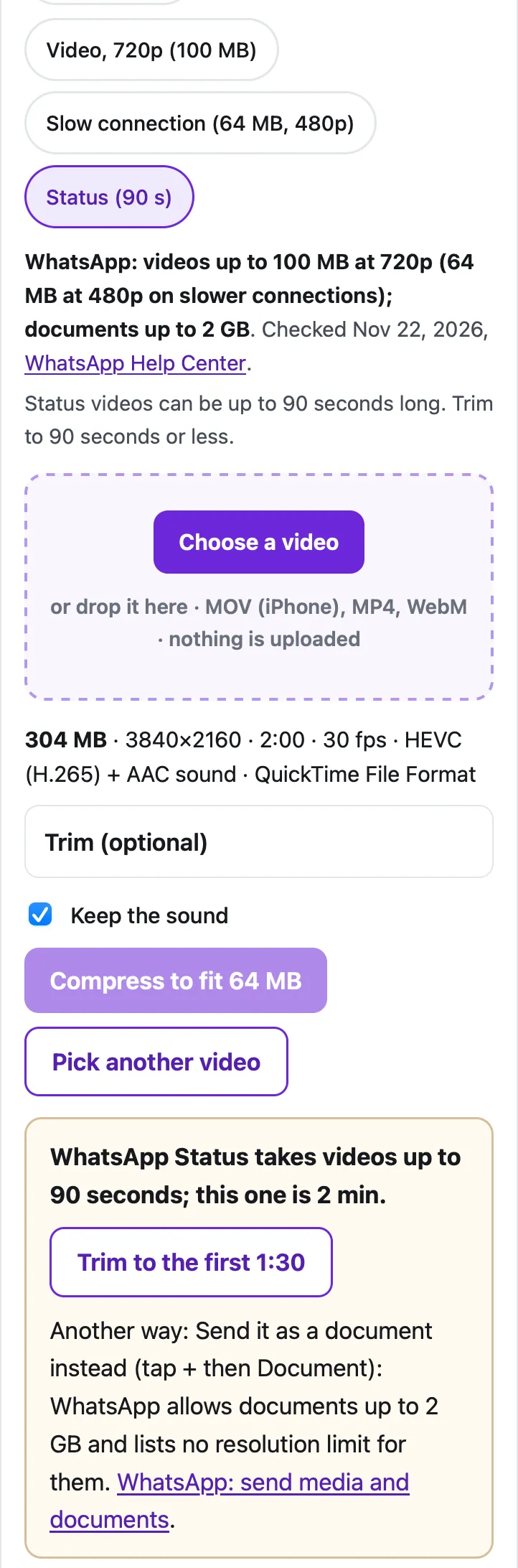
Choose Video, 720p (100 MB), or Slow connection (64 MB, 480p) if you’re on weak cellular, or Status (90 s).
-
Tap Choose a video and pick it from Photo Library.
-
For Status, if the clip is longer than 90 seconds, tap Trim to the first 1:30 or set your own start and end under Trim.
-
Tap Compress. When it’s done, tap Save to Photos or Files, then Save Video.
-
In WhatsApp, open the chat, tap + and pick the new video from your photos, or post it to your Status from the Updates tab.
On Android, do the same in Chrome, tap Download, then attach the video from your gallery in WhatsApp.
What did our tests produce?
We ran the tool in Safari’s engine (WebKit) on a Mac with an Apple M4 chip, on two 2-minute test clips made from the Creative Commons film Tears of Steel: a 4K HEVC .mov stored the way an iPhone records (304 MB), and a 1080p H.264 .mp4 like an Android phone saves (242 MB).
| Source | WhatsApp option | Result | Size | Time |
|---|---|---|---|---|
| 2 min 4K HEVC | Video, 720p (100 MB) | 1280×720 | 84.9 MB | 21 seconds |
| 2 min 4K HEVC | Slow connection (64 MB, 480p) | 854×480 | 38.9 MB | 23 seconds |
| First 90 s of the 4K clip | Status (90 s) | 1280×720 | 59.9 MB | 16 seconds |
| 2 min 1080p H.264 | Video, 720p (100 MB) | 1280×720 | 85.0 MB | 7.8 seconds |
At 720p, 100 MB holds a lot more than 2 minutes: the tool’s plan keeps a 5-minute phone video at 720p and a 10-minute one at 960×540 in WhatsApp’s limit. For longer recordings, trim them or send them as a document.
Should you send it as a document instead?
Send it as a document when the quality matters most, for example a video for editing, a long family video someone wants to keep, or anything you’d otherwise email. WhatsApp allows documents up to 2 GB and lists no resolution limit for them (it doesn’t promise they’re never compressed, though). On iPhone, tap +, then Document, and pick the file from Files (in Photos, use Share › Save to Files first). On Android, tap the paperclip, then Document.
If the other person doesn’t use WhatsApp, a plain text is much stricter: MMS is about 1 MB (see sending a long video by text on Android).
Send it as a video when it’s for watching in the chat right away: it plays inline and the other person doesn’t have to download a file. That’s when compressing first helps. Sending to an Android phone from an iPhone? See how to send a video from iPhone to Android without losing quality.
Questions people ask
What is the maximum video size on WhatsApp?
100 MB at 720p when you have a fast connection, or 64 MB at 480p on a slower one, according to WhatsApp's Help Center. Sent as a document, a file can be up to 2 GB.
How long can a WhatsApp Status video be?
90 seconds. Use the Status option in the tool: it checks the length and offers to trim the video to the first 90 seconds.
Why does my video look worse after sending it on WhatsApp?
WhatsApp says media files are usually compressed when shared, and quality might be lower than the original. Choosing HD quality helps for videos; for the untouched file, send it as a document.
How do I send a video as a document on WhatsApp?
In the chat, tap the + (iPhone) or the paperclip (Android), then Document, and pick the video file. WhatsApp allows documents up to 2 GB. On iPhone, save the video to Files first so it shows up in the document picker.
Is it better to compress a video before sending it on WhatsApp?
If it's over the limit, yes: you choose how it's shrunk (and what to trim) instead of WhatsApp refusing or squeezing it. A smaller file also uploads faster on cellular.
Related
- Compress for DiscordShrink a video to just under Discord's 20 MB free upload limit, or 10 MB, 50 MB or 1 GB, right in your browser. Free, nothing uploaded.
- iPhone to Android, full qualityTexted videos from iPhone to Android arrive blurry because of MMS. Five ways that keep quality (RCS, Quick Share, Google Photos, links), with real limits.
- Send a long video on iMessageLong video won't send in Messages, or arrives blurry? Apple's own fixes (AirDrop, iCloud link, Mail Drop), carrier MMS limits, and how to shrink it.
- All Cube toolsShrink a video to fit Gmail, Discord, WhatsApp or any limit